Product Data Management (PDM) Services
Cre8tive Technology & Design can help you synchronize your product data. PRO.FILE connects CAD drawings, documents and Bills of Materials, and keeps them in step with your Epicor ERP.
What Is a PDM System?
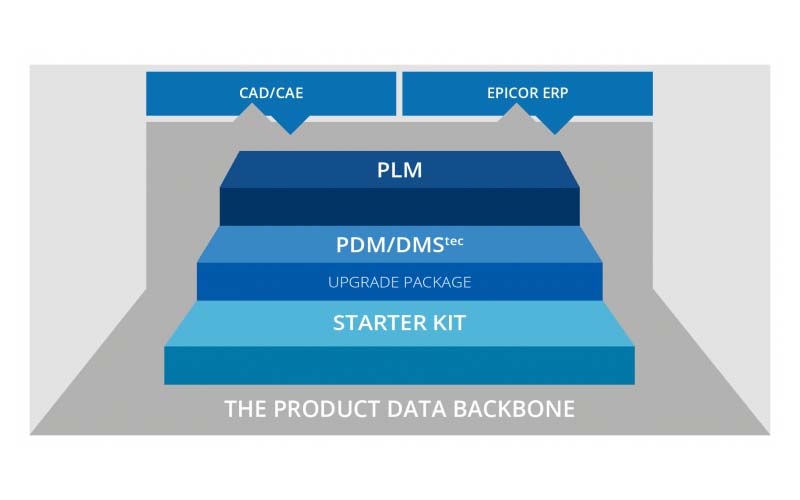
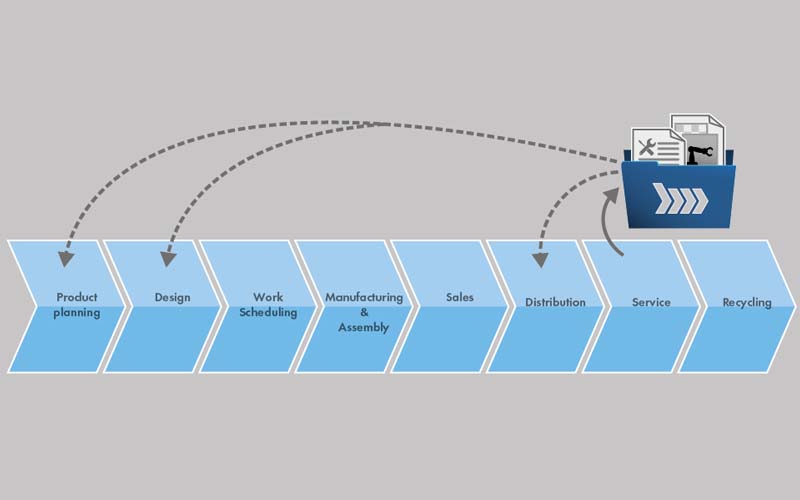
Product Data Management (PDM system) represents the second step after CAD data management. While the latter is limited to the mere storage and retrieval of CAD data, Product Data Management connects drawings, documents and Bills of Materials and integrates them with a ERP, workflow or document management system (DMStec system), making the Product Data Management system a complete repository of all the data required to describe a product – from CAD, ERP, and PLM. Its purpose is to record and manage the results delivered by product engineering and product management and to make them available along the product lifecycle.
A PDM solution automates the exchange of Bills of Materials between the CAD system and the ERP system, maintaining transaction integrity and eliminating the need to manually enter them into the ERP system. Design and purchase items are also automatically synchronized. A customizable set of rules governs the synchronization of data, which can be managed and monitored from a single pane of glass in the PDM system, thereby bridging the gap between the ERP, CAD and PDM environments. This gives companies a reliable product data foundation by breaking down the product data silos created by product engineering, project management, maintenance, development, and production and making the information available across department lines. This enables designers to go through the PDM system to access supplier and material master data stored in the ERP system directly from their CAD workstation at any time. The risk of error is significantly reduced and companies save money and resources by eliminating the need for redundant development work.
At a glance
- What it connects
- CAD drawings, documents, item masters and Bills of Materials
- ERP
- Automatic BOM and item master synchronization with Epicor ERP through Cre8 Hub
- CAD
- 30+ CAD integrations across MCAD and ECAD
- Platform
- PRO.FILE PLM by Revalize
- Delivered by
- Cre8tive Technology & Design: PRO.FILE sales, services and support for North America
CAD Integration in Product Data Management
CAD integration is where product data management starts. PRO.FILE integrates with more than 30 CAD systems, so models, drawings and their metadata are captured the moment a designer saves, not retyped later. Learn more about CAD data management.
Work inside your CAD system
Designers check in, check out and search PRO.FILE directly from their CAD application.
Bills of Materials from the model
Bills of Materials come straight from the CAD assembly structure, ready for review and release.
MCAD and ECAD in one BOM
Bills of Materials from mechanical and electrical engineering are aggregated into a single mechatronics BOM.
ERP data at the CAD workstation
Designers access supplier and material master data stored in the ERP system directly from their CAD workstation.
ERP Integration
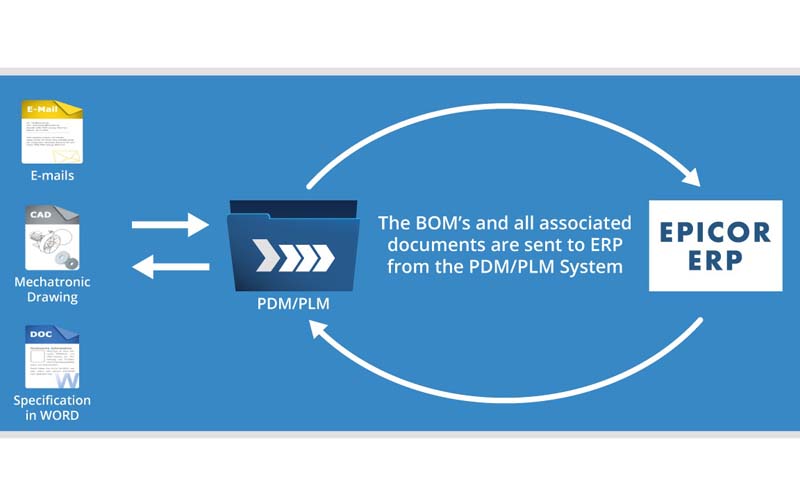
The integration of CAD and PDM (and, in the next step, PLM) systems with the ERP system is essentially about exchanging and transferring item master data, Product Structures (assemblies), Bills of Materials, and documents generated during the mechanical, electrical and electronic development stages to the ERP system. Bills of Materials from mechanical and electrical engineering are aggregated into a single mechatronics BOM. This automatically prevents purchasers from ordering components such as drives, which can be viewed as both a mechanical and electrical component, twice or not ordering them at all.
Conversely, it enables development and design departments to view information such as prices or stock levels of purchased parts in the ERP system through the PDM/PLM system. This is important if, for example, purchasing has negotiated a discount with a supplier that designers need to be aware of. Integrating the CAD, ERP and PLM systems puts this type of information at the fingertips of everyone involved. With a CAD-PDM/PLM-ERP integration in place, purchasing departments can make sure that any preferred parts that they agreed upon with a specific supplier are actually used by designers.
For Epicor manufacturers, Cre8 Hub Integration Services connect PRO.FILE and Epicor ERP, moving parts, Bills of Materials and engineering changes in both directions.
Bi-Directional Data Transfer
Product data silos and the manual transfer of information between various IT systems are a constant source of error, resulting in the need to do re-work and unnecessary costs. This can be avoided by maintaining data consistency and ensuring automatic synchronization between the different IT systems. For manufacturing and engineering companies, the question of how to synchronize item master data, bills of materials, and project data between the design and production department, in particular, presents a major challenge because in order to do so the very first step is to agree on which data needs to be exchanged between the CAD software, the ERP system, and the PDM/PLM solution and how to design the interfaces.
Outdated drawings and production documents are notorious stumbling blocks on the path to error-free manufacturing. They can be avoided by always having just one drawing available in a neutral PDF, PDF/A or TIF format that can be instantly accessed from across all departments. This is exactly what a PLM solution does. It ensures that drawings and other documents created during the design stage are available in the ERP system.
The same has to be true the other way around: Employees working in development can access information found in the ERP system such as prices or the stock level of purchased items. If, for example, technical purchasing has negotiated a discount with a supplier of motors, designers must be made aware that they are expected to use these components through the CAD/ERP integration. The PDM/PLM system PRO.FILE, for example, does this by means of a traffic light system for purchased parts – green stands for recommended parts, yellow means they may be used, and red denotes parts that must not be used.
The Benefits of PDM in CAD Data Management
What changes when CAD, PDM and ERP share one source of product truth.
Secure, protected access
Secure storage and protected access to product information.
Any authoring system
Product information can be stored regardless of the underlying authoring systems used in the fields of MCAD, ECAD, electronics, Office, and email.
Complete lifecycle files
Information is consolidated to create customer, machine and lifecycle files.
Valid drawings for manufacturing
Automatic provision of valid drawings for manufacturing purposes.
Automatic synchronization
Automatic synchronization of item master data and Bills of Materials between design / development and production planning / manufacturing / service.
Shared across departments
Product data is available across department lines, from engineering to purchasing, production and service.
Product Data Management vs. Manual BOM Entry
Retyping engineering data into ERP is where most product data errors start.
Without PDM
- Bills of Materials retyped from CAD into ERP by hand
- Purchasing orders shared components twice, or not at all
- Designers can't see prices, stock or preferred suppliers
- Outdated drawings reach the shop floor
- Product data scattered across department silos
With PRO.FILE PDM
- Bills of Materials transferred to ERP automatically
- One mechatronics BOM from MCAD and ECAD
- Prices, stock and preferred parts visible at the CAD workstation
- One valid drawing in PDF, PDF/A or TIF for every department
- One repository for data from CAD, ERP and PLM
From Product Data Management to PLM
Product data management is the second step. Each step builds on the last, on the same PRO.FILE platform.
1 · CAD data management
Store, version and secure CAD models and drawings from every CAD system in one vault.
Explore CAD data management →
2 · Product data management
Connect drawings, documents and Bills of Materials, and synchronize them with your ERP.
You are here
3 · Product lifecycle management
Add change management, workflows, compliance and portals across the whole product lifecycle.
Explore Pro.File PLM →
Product Data Management FAQ
Straight answers to the questions we hear most.
What is product data management (PDM)?
What do your product data management services include?
What is CAD integration in product data management?
How does PDM integrate with Epicor ERP?
What is the difference between PDM and PLM?
Is product data management only for engineering?
Partner with Cre8tive for All of Your PLM and ERP Needs
Learning about the requirements, objectives, and roadblocks of your operations and industry is the catalyst for every conversation we will have during the PLM integration process. Share your expectations, goals, and timelines with us. We will collaboratively plan with you and your team will have access to an integration partner every step of the way.
Related PLM resources
Watch Pro.File PLM in action and see how it brings your product data, CAD, and ERP together in one place.
The configurable solution for PLM, PDM, and document management: features, benefits, and how it fits your business.